
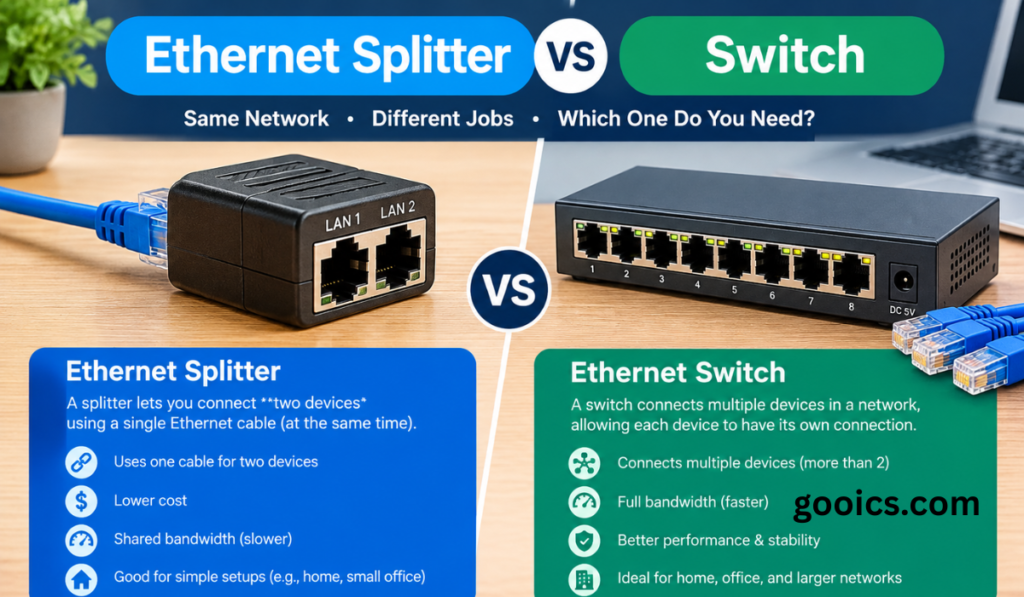

You have one Ethernet cable running to a room and two (or five) devices that need a wired connection. Two products come up immediately: the cheap, tiny Ethernet splitter and the slightly pricier network switch. They look like they solve the same problem, but they work in completely different ways, and picking the wrong one can leave you with slow speeds, dropped connections, or a device that simply won’t work.
This guide explains how each one works, where each one fails, and exactly which to buy for your situation.
The Short Answer
Buy a switch. In almost every case, an Ethernet switch is the better choice: it is faster, more reliable and lets every device use the connection at once. An Ethernet splitter only makes sense in a narrow situation: you cannot run another cable, your devices only need 10/100 Mbps, and you are willing to buy splitters in pairs.
| Feature | Ethernet Splitter | Ethernet Switch |
|---|---|---|
| Type | Passive (no power) | Active (needs power) |
| Max speed | 100 Mbps | 1 Gbps, 2.5 Gbps, 10 Gbps and up |
| Devices supported | 2 (one pair of splitters) | 4, 5, 8, 16, 24+ ports |
| Units needed | 2 (one at each end of the cable) | 1 |
| Simultaneous use | Yes, but each device is capped at 100 Mbps | Yes, full speed per port |
| Setup | Plug and play | Plug and play (unmanaged) |
| Typical price | $5–$15 for a pair | $15–$40 (basic) and up |
| Best for | Legacy or low-bandwidth needs | Nearly everything else |
What Is an Ethernet Splitter?
An Ethernet splitter is a small passive adapter that divides a single network cable into two separate connections. Understanding why it is limited requires a quick look at what is inside a standard Ethernet cable.
A typical Cat5e or Cat6 cable contains eight wires twisted into four pairs. Gigabit Ethernet uses all four pairs at once. Older 10/100 Mbps Ethernet only uses two of the four pairs. A splitter exploits this: it gives two pairs to one device and the other two pairs to a second device.
That is also the catch. Because each device only gets two pairs, neither can run faster than 100 Mbps, no matter how fast your router, cable or internet plan is. Even if you pay for a gigabit connection, a device behind a splitter tops out at Fast Ethernet speeds.
You Need Two Splitters, Not One
A splitter does not create a network by itself. You need one at each end of the cable: one near the router (to combine two router ports onto the single cable) and one at the destination (to fan the cable back out into two devices). This means two router ports are used, which is a common surprise for buyers.
In practice, the setup looks like this:
- Two cables go from the router (or a wall jack) into splitter A.
- A single cable runs between splitter A and splitter B.
- Splitter B fans out into two cables for your two devices.
Limitations of Ethernet Splitters
- Capped at 100 Mbps per device, which is slower than many home internet plans.
- Pairs only. You cannot daisy-chain splitters to feed more than two devices.
- Requires two free router ports at the source end.
- Cable quality matters. Splitters rely on the pairs being clean, and long runs or poor cables increase errors.
- Incompatible with Power over Ethernet (PoE) in most cases, since PoE needs spare pairs.
- No traffic management. There is no intelligence, just wiring.
What Is an Ethernet Switch?
An Ethernet switch is an active networking device with multiple ports. You plug one port into your router and connect your other devices to the remaining ports. Unlike a splitter, a switch reads the data passing through it.
Every network device has a unique hardware address (a MAC address). When a switch receives a data frame, it looks at the destination address and forwards it only to the port where that device lives. Over time it builds a table of which device sits on which port, so traffic is not blasted to every connected device.
Because every port is a full Ethernet connection with its own dedicated bandwidth, a gigabit switch gives each connected device up to 1 Gbps, simultaneously.
Switch vs Hub
Older hubs repeated every incoming signal to every port, which caused collisions and wasted bandwidth. Switches replaced hubs decades ago. If you see a product called a hub, avoid it. A modern switch is vastly more efficient.
Unmanaged vs Managed Switches
- Unmanaged switches are plug and play with no configuration. They are ideal for homes, home offices and small setups.
- Managed switches let you configure VLANs, quality of service (QoS), port mirroring, link aggregation and monitoring. These suit businesses, advanced home labs and anyone segmenting their network.
- Smart or web-managed switches sit in the middle, offering selected features at a lower cost.
Advantages of an Ethernet Switch
- Full speed on every port, from 100 Mbps up to 10 Gbps and beyond.
- Scalable: 5, 8, 16, 24 or 48 ports. Add more by connecting another switch.
- Reliable and efficient thanks to intelligent traffic forwarding.
- Only one cable has to run to the room, and only one router port is used.
- PoE options can power cameras, access points and VoIP phones over the same cable.
- Future proof, since it supports the speeds modern devices need.
Drawbacks of a Switch
- Needs a power outlet (unless it is powered through PoE).
- Costs a little more than a splitter pair, though basic gigabit models are inexpensive.
- Very cheap models may lack features, and large managed switches can run warm and noisy.
Ethernet Splitter vs Switch: Head-to-Head
1. Speed
This is the biggest difference. A splitter limits each device to 100 Mbps. A gigabit switch gives each device up to 1,000 Mbps, and multi-gig switches go further. If you stream 4K video, game online, transfer large files to a NAS or have a fast internet plan, a splitter will bottleneck you.
2. Number of Devices
A splitter handles two devices. A switch handles as many as it has ports and can be expanded easily. Planning ahead for a smart TV, game console, streaming box and desktop PC? A switch is the clear choice.
3. Power Requirements
Splitters need no power. Switches do. For most people, plugging a small adapter into an outlet is trivial, but if there is no outlet near the destination, this can matter. PoE-powered switches or PoE injectors can solve it in some cases.
4. Ease of Setup
Both are essentially plug and play. Splitters require you to buy and place two units correctly, with each end oriented properly. A switch is simply one box in the middle.
5. Reliability and Performance
Switches handle simultaneous traffic cleanly. Splitters can work fine for light, low-bandwidth tasks, but they depend on cable quality and offer no error handling beyond what the cable provides.
6. Cost
A splitter pair costs a few dollars. A reliable five-port gigabit switch from a known brand is usually inexpensive as well. Considering the speed difference, the switch delivers far better value.
When Should You Use an Ethernet Splitter?
A splitter can be a reasonable stopgap if all of these are true:
- You have only one cable and cannot run another.
- Your devices only need up to 100 Mbps, such as a printer, an older smart TV, a basic IoT hub or a VoIP phone.
- You need exactly two devices.
- You have two spare router ports, and you will buy two splitters.
Even then, check that your devices do not need gigabit speeds. If any of those conditions fails, use a switch.
When Should You Use an Ethernet Switch?
Choose a switch if you want to:
- Connect gaming consoles, PCs, smart TVs, NAS drives or streaming boxes at full speed.
- Get the full benefit of a gigabit or faster internet plan.
- Add more than two wired devices now or later.
- Build a home office, home theater or media setup in one room.
- Run PoE devices like security cameras or Wi-Fi access points (with a PoE switch).
- Create a reliable small business or home lab network.
How to Choose the Right Switch
Port Count
Pick a switch with more ports than you need today. A 5-port switch fits most single-room setups, and an 8-port model leaves room to grow. Remember that one port is used for the uplink to your router.
Speed Rating
- Fast Ethernet (100 Mbps): outdated, avoid for new purchases.
- Gigabit (1 Gbps): the standard for most homes.
- 2.5 GbE / 10 GbE: worthwhile for fast NAS storage, multi-gig internet plans, creator workstations and high-end Wi-Fi 6E/7 access points.
Managed or Unmanaged
If you only want more ports, buy unmanaged. If you need VLANs, QoS or monitoring, buy smart or managed.
PoE Support
If you plan to power cameras, access points or phones through the cable, look for a PoE or PoE+ switch and check its total PoE power budget, not just per-port ratings.
Build Quality and Extras
A metal casing, fanless design for quiet rooms, wall-mount or rack-mount options and a reputable brand’s warranty are all worth considering. Look for energy-efficient Ethernet support if the switch will run constantly.
Common Mistakes to Avoid
- Buying only one splitter. It will not work. Splitters must be used in pairs.
- Expecting gigabit through a splitter. The wiring physically prevents it.
- Using a splitter with PoE devices. It can cause failures or damage.
- Daisy-chaining splitters to get more than two connections. It does not work.
- Confusing a splitter with a hub or switch. They are different technologies.
- Ignoring cable quality. An old, damaged or very long cable limits any device, so check your Cat5e or Cat6 cable.
- Creating a network loop. When connecting multiple switches, avoid plugging two ports of the same switch into each other or creating redundant loops without spanning tree support.
Frequently Asked Questions
Can an Ethernet splitter slow down my internet?
Yes. Each device behind a splitter is limited to 100 Mbps. If your plan is faster than that, you will not get the full speed on those devices.
Do I need two Ethernet splitters?
Yes. One is needed at each end of the cable. A single splitter on its own does not work.
Can I use an Ethernet splitter with a gigabit connection?
No. A splitter cannot deliver gigabit speeds because gigabit uses all four wire pairs, and a splitter divides them between two devices.
Is an Ethernet switch the same as a hub or a router?
No. A hub repeats traffic to every port, a switch forwards traffic only where it needs to go, and a router connects separate networks (for example, your home network to the internet) and typically assigns IP addresses.
Does an Ethernet switch reduce internet speed?
A quality switch does not noticeably reduce speed. Your devices share the internet connection coming from your router, but each device gets a full-speed link to the switch itself.
Can I plug a switch into another switch?
Yes. This is called daisy-chaining or cascading, and it is common. Avoid creating loops, and keep the chain reasonably short for best performance.
Do I need a managed switch at home?
Usually not. An unmanaged gigabit switch covers most households. Choose managed or smart only if you need VLANs, QoS or detailed monitoring.
Is a switch better than Wi-Fi?
For stationary devices, a wired connection through a switch is generally faster, more stable and lower in latency than Wi-Fi.
Final Verdict
An Ethernet splitter is a clever trick for a very specific, increasingly rare problem. It is cheap, but it is capped at 100 Mbps, needs two units, supports only two devices and is fragile compared with a proper network device.
An Ethernet switch is the right answer for nearly everyone. It delivers full speed on every port, scales with your needs, works with PoE, and costs only slightly more. If you are setting up a home office, gaming station or media center, spend a little extra on a reliable gigabit switch and you will not need to think about your network again.
Rule of thumb: if you are wondering whether you need a splitter or a switch, you need a switch.