

Running a small business in 2026 means wearing a dozen hats — marketer, bookkeeper, customer support rep, and sometimes even IT — often without the budget to hire for any of them separately. The good news is that cloud AI tools have matured to the point where a genuinely useful stack no longer requires an enterprise contract. Many of the assistants, design tools, and automation platforms that were paid add-ons in 2025 now ship with real, usable free tiers.
This guide breaks down the best free cloud AI tools worth setting up this year, organized by the jobs they actually solve.
Not All “Free” Is the Same
Before picking tools, it helps to know what kind of “free” you’re getting, because the label gets used loosely:
- Genuinely free — no credit card required, usable indefinitely, with limits a small business will rarely hit. Free tiers of ChatGPT, Claude, and Canva generally fall here.
- Free with limits or watermarks — usable for real work, but capped on volume, resolution, or team seats.
- Trial disguised as free — free for 14–30 days, then a hard paywall. Fine for evaluating a tool, risky if you build a core workflow around it.
Knowing which bucket a tool falls into before you commit to it saves you from rebuilding a workflow later when the free period suddenly ends.
1. General AI Assistants for Writing and Problem-Solving
For day-to-day drafting, brainstorming, and quick research, a general-purpose AI assistant is the highest-leverage free tool a small business can adopt.
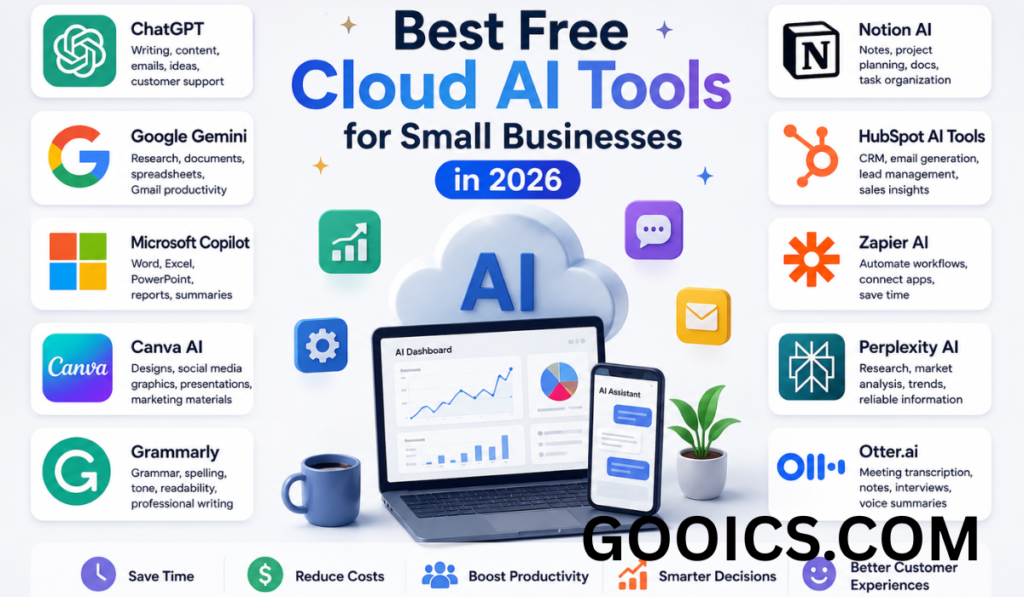
- ChatGPT remains the most widely used option, and its free tier covers drafting emails, writing social posts, outlining blog content, and summarizing meeting notes.
- Claude is a strong pick when you need longer, more carefully reasoned output — contracts, policy drafts, or detailed customer replies — and its free tier is generous enough for regular small-business use.
- Google Gemini stands out if your business already runs on Gmail, Docs, Sheets, and Drive. Its free tier can summarize email threads, analyze spreadsheet data, and draft content directly inside the Google apps you already use.
Rather than picking just one, many small teams keep two of these open: one as a daily writing assistant, and one for tasks that benefit from deeper research or Google Workspace integration.
2. Meeting Notes and Transcription
Sitting through a call just to type up notes afterward is one of the easiest tasks to hand off to AI.
- Otter and Fathom both offer free tiers that transcribe calls, generate summaries, and pull out action items automatically.
- Zoom AI Companion is worth checking if your team already runs meetings on Zoom, since it adds automatic transcription and summaries without a separate login.
For a small business doing several client or team calls a week, this alone can save hours of admin time monthly.
3. Design and Content Creation
You don’t need a design budget to produce professional-looking marketing material anymore.
Canva’s AI features — including tools that generate a complete layout from a text prompt, remove unwanted elements from photos, and keep your branding consistent across assets — are available on Canva’s free plan, with a paid upgrade (roughly $15/month) unlocking higher usage and more advanced features. For a small business producing social graphics, flyers, or simple video content, the free tier alone is often enough.
4. Workflow Automation
Automation tools connect the apps you already use so information moves between them without manual copy-pasting.
- Zapier connects thousands of apps and now layers AI on top of its automations — for example, routing a new website inquiry straight into your CRM, sending an acknowledgment email, and alerting your sales team, all without manual steps.
- Make and n8n are strong alternatives, particularly if you want more control over complex, multi-step workflows or prefer a more visual builder.
All three offer free tiers suitable for a handful of active automations, which is usually enough for a small operation to start eliminating repetitive admin work.
5. Knowledge Management and Organization
If your team’s notes, project plans, and documentation are scattered across tools, an AI-enabled workspace can pull them together.
Notion AI is built directly into Notion and is free for personal use and small teams already using the platform for notes and project tracking. It can summarize long documents, draft content inline, and answer questions about your own workspace content — useful for keeping institutional knowledge searchable as your team grows.
6. Customer Service and Communication
Customer-facing AI tools tend to have the steepest jump from free to paid, since call and chat volume scales quickly. Still, several platforms offer free or low-cost entry points:
- Many CRM and helpdesk platforms now bundle basic AI chat responses or ticket summarization into their free or starter tiers — worth checking before assuming you need a paid plan on day one.
- HubSpot offers a free CRM tier with some AI-assisted content and lead-scoring features, which can be a reasonable starting point before upgrading to its more advanced marketing tools.
If your business handles significant call volume, dedicated AI voice and chat platforms are worth evaluating, though most require a paid plan once you move past a small number of monthly interactions.
How to Actually Choose
With dozens of tools competing for the same “best AI tool” headline, a simple filter helps cut through the noise:
- Pick one high-impact, recurring task — the one that eats the most time every single week.
- Apply a single free tool to it rather than trying to overhaul your entire workflow at once.
- Measure the time saved before adding a second or third tool.
- Upgrade only where AI sits inside work you already do daily. A copilot embedded in your inbox or documents earns its keep; a standalone tool nobody opens does not.
The Bottom Line
The best free cloud AI stack for a small business in 2026 doesn’t require six overlapping subscriptions. A solid starting combination looks like: one general assistant (ChatGPT, Claude, or Gemini) for writing and research, one meeting tool (Otter or Fathom) for call notes, Canva’s AI features for design, and Zapier or n8n for connecting your everyday apps. Start there, track what actually saves you time, and expand — or upgrade to paid tiers — only where the free version genuinely runs out of room.
Best Free Cloud AI Tools for Small Businesses in 2026: Frequently Asked Questions
Q1: What are the best free cloud AI tools for small businesses in 2026? The strongest free options cover different jobs rather than one “best overall” tool: ChatGPT, Claude, or Google Gemini for writing and research; Otter or Fathom for meeting transcription; Canva for AI-assisted design; and Zapier or n8n for connecting apps and automating repetitive tasks. Most small businesses get the most value from combining two or three of these rather than relying on a single tool.
Q2: Are these AI tools really free, or just free trials? It depends on the tool, and the difference matters. Some — like the free tiers of ChatGPT, Claude, and Canva — are genuinely free indefinitely, with usage limits a small business will rarely hit. Others are free but capped by volume, resolution, or number of users. A smaller group are trials that convert to paid plans after 14–30 days. Before building a core workflow around a tool, check which category it falls into.
Q3: Which free AI tool is best for writing emails, content, and everyday drafting? ChatGPT is the most widely used for this, with a free tier that handles email replies, social posts, and blog outlines well. Claude is a good alternative when you need longer or more carefully reasoned writing, such as policy documents or detailed customer responses. Google Gemini is worth using instead if your business already runs on Gmail, Docs, and Sheets, since it works directly inside those apps.
Q4: Can free AI tools handle customer service for a small business? To a limited extent. Many CRM and helpdesk platforms now include basic AI chat responses or ticket summarization in their free or entry-level tiers, which can help with simple, high-volume questions. However, most dedicated AI voice or chat platforms require a paid plan once your call or chat volume grows past a small threshold, so treat free customer-service AI as a starting point rather than a permanent solution.
Q5: What’s the best free AI tool for meeting notes and transcription? Otter and Fathom both offer free tiers that transcribe calls, summarize discussions, and extract action items automatically. If your team already meets on Zoom, Zoom AI Companion adds similar functionality without needing a separate tool or login.
Q6: Is Canva’s AI actually useful for a small business with no design experience? Yes. Canva’s free plan includes AI features that generate a full design from a text prompt, remove unwanted elements from images, and keep branding consistent across graphics — enough for a small business to produce professional-looking social posts, flyers, and simple marketing assets without hiring a designer.
Q7: What’s the difference between Zapier, Make, and n8n for automation? All three connect the apps a small business already uses so information moves between them automatically — for example, adding a new lead to your CRM and sending a follow-up email without manual steps. Zapier has the broadest app support and is the easiest to start with. Make and n8n suit teams that want more control over complex, multi-step workflows or prefer a visual, node-based builder. All three offer free tiers suitable for a handful of active automations.
Q8: Do I need Notion AI if I don’t already use Notion? Probably not right away. Notion AI is built into Notion and is free for personal use and small teams already using it for notes and project tracking. It’s most valuable if your team’s documentation is already scattered across a workspace you’re trying to organize — it’s not worth adopting Notion from scratch just for the AI features alone.
Q9: How many free AI tools should a small business actually use? Fewer than most guides suggest. A practical approach is to pick the single most time-consuming recurring task, apply one free tool to it, and measure the time saved before adding another. A stack of one general assistant, one meeting tool, one design tool, and one automation tool is usually enough to start; six overlapping subscriptions is rarely necessary.
Q10: When should a small business upgrade from a free plan to a paid one? Upgrade when the AI tool sits inside work your team does every day and the free tier’s limits start blocking that work — for example, hitting a monthly transcription cap or needing higher-resolution design exports. Paying for a tool that’s already proven its value in daily use is easier to justify than paying upfront for features you haven’t tested yet.


Pingback: Cloud AI Software: How It Works and Why Businesses Are Adopt