
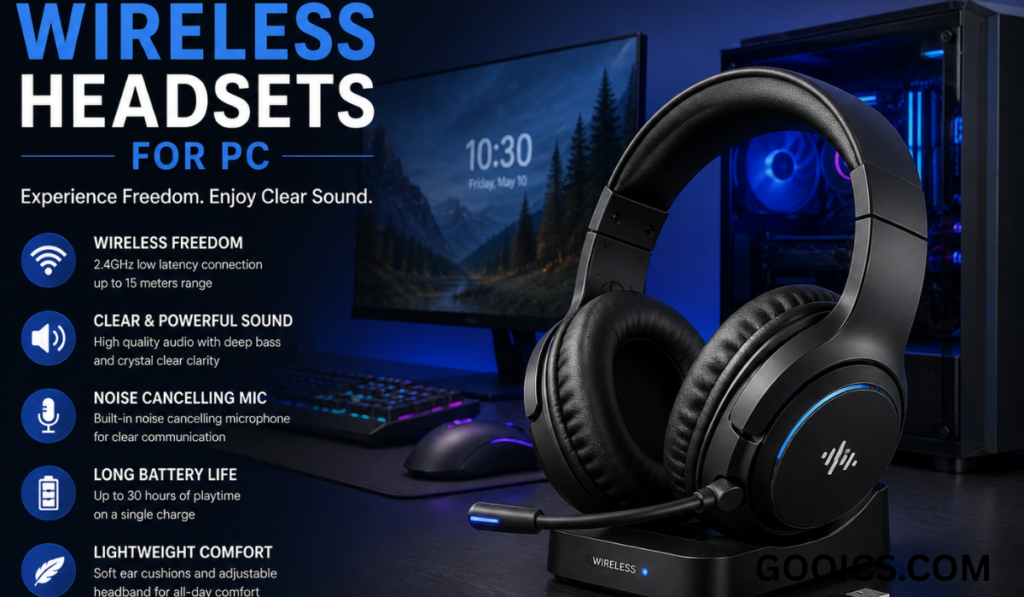

Gone are the days when a tangled mess of cables was the price you paid for good audio while gaming, working, or streaming. Today, wireless headsets for PC have become the standard for anyone who values freedom of movement, clean desk setups, and high-quality sound — without compromising on performance.
Whether you’re a competitive gamer, a remote worker on back-to-back video calls, or someone who simply enjoys immersive audio while working, choosing the right wireless headset can make a noticeable difference in comfort, convenience, and overall experience. In this guide, we’ll explore everything you need to know about wireless headsets for PC — how they work, what to look for, and why they’re worth the investment.
Why Choose a Wireless Headset for Your PC?
Wireless headsets offer several advantages over their wired counterparts, making them a popular choice among PC users:
- Freedom of Movement: No cables means you can lean back, walk around your desk, or gesture freely during calls or gaming sessions without restriction.
- Cleaner Setup: Fewer wires mean a tidier desk, which is especially appealing for streamers and content creators who care about aesthetics.
- Convenience: Most wireless headsets connect via USB dongle or Bluetooth, allowing quick and easy pairing across multiple devices.
- Modern Comfort: Many wireless models are designed with extended wear in mind, featuring lightweight builds and breathable ear cushions.
How Do Wireless Headsets for PC Work?
Wireless PC headsets typically connect in one of two ways:
- RF (Radio Frequency) via USB Dongle: This is the most common method for gaming headsets, offering low latency and stable connections — ideal for fast-paced gaming where audio delay can affect performance.
- Bluetooth: Common in more general-use headsets, Bluetooth offers broader compatibility across laptops, phones, and tablets, though it can sometimes introduce slight latency compared to RF connections.
Some premium headsets even offer dual connectivity, allowing you to switch seamlessly between your PC and a mobile device.
Key Features to Look for in a Wireless PC Headset
1. Audio Quality
Look for headsets with clear highs, balanced mids, and punchy bass — especially important for gaming, music, and movies. Many gaming-focused headsets also offer virtual surround sound for a more immersive experience.
2. Microphone Performance
For work calls, streaming, or online gaming, a clear, noise-canceling microphone is essential. Detachable or retractable mics are a bonus for those who don’t always need voice input.
3. Battery Life
Battery life varies widely between models — ranging from 15 hours to over 40 hours on a single charge. If you use your headset for long work sessions or extended gaming, prioritize longer battery life.
4. Comfort and Build Quality
Since headsets are often worn for hours at a time, padded ear cups, an adjustable headband, and lightweight materials go a long way in preventing discomfort or fatigue.
5. Latency and Connection Stability
For gaming, low-latency RF connections are typically preferred over Bluetooth, as they minimize any noticeable audio delay during fast-paced gameplay.
6. Compatibility
Ensure the headset works well with your specific setup — whether that’s Windows, Mac, or multi-device use across PC, console, and mobile.
Best Use Cases for Wireless PC Headsets
- Gaming: Immersive sound, low-latency connections, and comfortable extended wear make wireless headsets a favorite among gamers.
- Remote Work: Clear microphones and comfortable all-day wear are essential for professionals on frequent video calls.
- Content Creation: Streamers benefit from clean setups and reliable audio quality without cable clutter interfering with their space.
- Everyday Multitasking: From listening to music while working to taking casual calls, wireless headsets offer flexibility for everyday use.
Tips for Getting the Most Out of Your Wireless Headset
- Keep firmware and drivers updated for optimal performance and compatibility.
- Store your headset properly (many come with charging docks or stands) to maintain battery health.
- Adjust audio and microphone settings through companion software, if available, to fine-tune your experience.
- Position your USB dongle appropriately to avoid signal interference from other wireless devices.
Final Thoughts
Wireless headsets for PC have evolved far beyond simple convenience — they now rival, and in many cases surpass, wired options in sound quality, comfort, and functionality. Whether you’re gaming competitively, working remotely, or simply enjoying media without the hassle of cables, investing in a quality wireless headset can significantly enhance your overall PC experience.
As wireless technology continues to improve, expect even better battery life, lower latency, and richer audio quality in the headsets of tomorrow — making the case for going wireless stronger than ever.
FAQS “Wireless Headsets for PC”:
1. What is a wireless headset for PC?
A wireless headset for PC is an audio device that connects to your computer without cables, typically using a USB RF dongle or Bluetooth, allowing you to listen to audio and use a microphone without being physically tethered to your device.
2. How do wireless headsets connect to a PC?
Most wireless headsets connect either through a USB RF dongle, which offers a stable, low-latency connection, or via Bluetooth, which provides broader compatibility across multiple devices like laptops and phones.
3. Are wireless headsets good for gaming?
Yes, many wireless headsets are specifically designed for gaming, offering low-latency RF connections, immersive surround sound, and comfortable long-wear designs suited for extended gaming sessions.
4. Do wireless headsets have noticeable audio delay?
RF-based wireless headsets typically have minimal to no noticeable delay, making them suitable for gaming, while Bluetooth headsets may have slightly higher latency, though this is often unnoticeable for general use like music or calls.
5. How long does the battery last on a wireless PC headset?
Battery life varies by model, generally ranging from 15 to 40+ hours on a single charge, depending on the headset’s features and usage, such as active noise cancellation or RGB lighting.
6. Can I use a wireless headset for both gaming and work calls?
Yes, most wireless headsets are versatile enough for both gaming and professional use, especially those with clear, noise-canceling microphones suitable for video calls and voice chat.
7. Do wireless headsets work with both PC and console?
Many wireless headsets offer multi-platform compatibility, working with PC, PlayStation, Xbox, and even mobile devices, though it’s important to check specific compatibility before purchasing.
8. What should I look for when buying a wireless headset for PC?
Key factors include audio quality, microphone clarity, battery life, comfort, connection stability, and compatibility with your specific devices and operating system.
9. Is Bluetooth or RF better for a wireless PC headset?
RF connections are generally better for gaming due to lower latency, while Bluetooth offers more flexibility for everyday use across multiple devices, including phones and tablets.
10. Can wireless headsets be used while charging?
Yes, most modern wireless headsets support simultaneous use and charging, allowing uninterrupted use even when the battery is low.
11. Are wireless headsets comfortable for long gaming or work sessions?
Quality wireless headsets are designed with padded ear cushions, adjustable headbands, and lightweight materials to ensure comfort during extended use, though comfort can vary between models.
12. How do I fix connection issues with my wireless PC headset?
Common fixes include ensuring the USB dongle has a clear line of sight, updating firmware or drivers, keeping the headset charged, and avoiding interference from other wireless devices nearby.
Want me to expand this into a downloadable FAQ document, add FAQ schema markup for SEO, or tailor the questions specifically for gaming headsets or office/remote work use?
Want to be notified when Claude responds? further — for example, focused specifically on gaming headsets, remote work/office use, budget vs. premium options, or formatted as an SEO product page?