
Work no longer happens inside a single building, on a single network, or between nine and five. Teams are distributed across cities and time zones, tools live in the cloud, and employees expect the same seamless experience at work that they get from consumer apps. This shift has turned digital workplace software from a “nice to have” into the backbone of how organizations function.
This guide breaks down what digital workplace software actually is, the problems it solves, the categories that make it up, and how to choose the right platform for your organization.
What Is Digital Workplace Software?
Digital workplace software is a category of technology that brings together the tools, information, and communication channels employees need to do their jobs into one connected digital environment. Instead of switching between disconnected systems — email here, file storage there, a separate chat app, a separate project tracker — a digital workplace platform unifies these functions (or at least connects them) so people can find information, collaborate, and complete tasks without friction.
Think of it as the digital equivalent of a physical office: a place where people communicate, access resources, complete tasks, and stay connected to company culture — except it’s accessible from anywhere, on any device.
Why Digital Workplace Software Matters Now
A few forces have made this software category essential rather than optional:
- Hybrid and remote work is permanent. Even organizations that have brought employees back to the office at least part-time still rely on distributed collaboration for global teams, field workers, and cross-office projects.
- Tool sprawl is a real cost. The average employee now toggles between a dozen or more apps daily. Each switch costs time, focus, and context — a phenomenon often called “app fatigue” or “context switching tax.”
- Institutional knowledge is scattered. Without a central digital workplace, critical information lives in someone’s inbox, a forgotten spreadsheet, or a Slack thread that’s impossible to find six months later.
- Employee experience drives retention. Clunky, frustrating internal tools are now cited as a real driver of disengagement and turnover, especially among younger employees who expect intuitive software.
Core Components of a Digital Workplace Platform
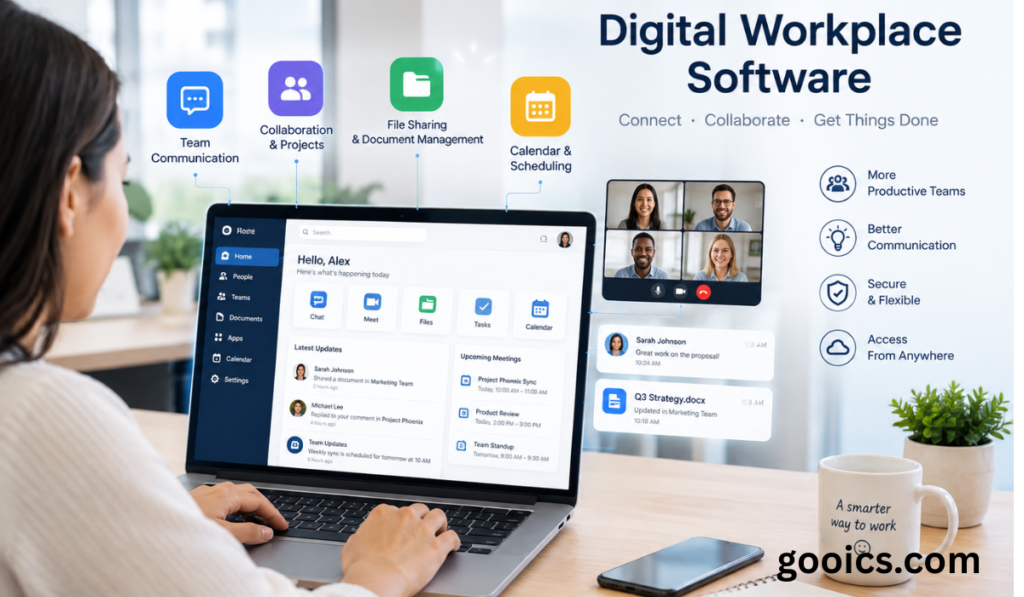
Most digital workplace solutions are built from some combination of the following pillars:
1. Communication and Collaboration
Real-time chat, video conferencing, and team channels that replace (or reduce reliance on) email for day-to-day conversation. This is often the most visible layer of a digital workplace.
2. Document and Content Management
Centralized, searchable storage for files, wikis, and knowledge bases, with version control and permissioning so the right people can access the right information at the right time.
3. Intranet and Employee Portals
A single front door for company news, policies, HR resources, and announcements — designed to feel more like a personalized homepage than a static bulletin board.
4. Workflow and Task Management
Tools for assigning work, tracking projects, and automating repetitive processes like approvals, onboarding checklists, or IT requests.
5. Integration and Single Sign-On (SSO)
The connective tissue that ties everything together. Modern digital workplace platforms act as a hub that integrates with CRMs, HR systems, and other line-of-business applications, often through APIs or low-code connectors.
6. Analytics and Employee Insights
Dashboards that help IT and HR leaders understand tool adoption, identify bottlenecks, and measure how digital experience correlates with productivity and engagement.
Types of Digital Workplace Software
Not every organization needs the same mix. Broadly, solutions fall into a few categories:
- All-in-one suites (e.g., Microsoft 365, Google Workspace) that bundle email, chat, storage, and productivity tools under one ecosystem.
- Collaboration-first platforms (e.g., Slack, Microsoft Teams) centered on messaging and meetings, often extended through integrations.
- Intranet and employee experience platforms focused on internal communications, culture, and knowledge management.
- Workflow automation and low-code platforms that let teams build custom internal tools and automate processes without heavy engineering support.
- Digital adoption platforms layered on top of existing software to guide employees through new tools with in-app walkthroughs and tooltips.
Many organizations end up with a hybrid stack: a core suite for productivity, a dedicated intranet for culture and communication, and point solutions for specialized workflows.
Key Benefits
Improved productivity. When information and tools are centralized, employees spend less time searching and more time doing meaningful work.
Stronger collaboration across distance. Distributed teams can co-author documents, hold effective meetings, and stay aligned without relying on constant back-and-forth email chains.
Better employee experience. A well-designed digital workplace feels less like a patchwork of software and more like a coherent environment — which shows up in engagement and retention metrics.
Faster onboarding. New hires can get up to speed quickly when policies, training materials, and team introductions live in one accessible place instead of being scattered across departments.
Greater agility. Centralized systems make it easier to roll out policy changes, share urgent updates, or pivot processes company-wide.
Data-driven decision making. Usage analytics reveal which tools are actually adding value and where friction is slowing people down, helping IT prioritize investment.
Common Challenges to Watch For
Digital workplace software isn’t a silver bullet. Organizations frequently run into:
- Tool overload disguised as a solution. Adding another platform without retiring old ones just adds another tab to keep open.
- Low adoption. Even the best platform fails if employees aren’t trained on it or don’t see a clear reason to change habits.
- Security and governance gaps. Centralizing information also centralizes risk — permissions, data loss prevention, and compliance need to be built in from day one, not bolted on later.
- Poor integration. A digital workplace that doesn’t talk to your existing CRM, ERP, or HR system just creates another silo.
How to Choose the Right Digital Workplace Software
When evaluating vendors, consider:
- Does it fit your existing ecosystem? Look for strong integration with the tools your teams already rely on rather than forcing a wholesale replacement.
- Is it built for how your people actually work? Frontline and field employees have very different needs than knowledge workers at desks — mobile access matters more than most vendors admit.
- How strong is search and knowledge discovery? A digital workplace is only as useful as its ability to surface the right information quickly.
- What’s the security and compliance posture? Confirm data residency, access controls, and audit capabilities meet your industry’s requirements.
- What does change management look like? The best software still requires a rollout plan, training, and internal champions to succeed.
- Can it scale with you? Consider not just today’s headcount but how the platform handles growth, acquisitions, or new business units.
The Road Ahead
Digital workplace software continues to evolve alongside broader shifts in how organizations operate. Expect to see deeper AI integration for summarizing meetings, drafting communications, and surfacing relevant knowledge automatically; more no-code/low-code customization so business teams can build their own workflows; and a continued push toward “employee experience platforms” that treat internal tools with the same design rigor as customer-facing products.
Final Thoughts
Digital workplace software isn’t just about consolidating apps — it’s about removing friction from how people find information, connect with colleagues, and get work done. Organizations that invest thoughtfully in the right mix of tools, backed by strong governance and genuine employee buy-in, position themselves to be more agile, resilient, and attractive places to work in an increasingly distributed world.
The goal isn’t to chase every new platform on the market. It’s to build a coherent digital environment where technology fades into the background and the work itself takes center stage.
Digital Workplace Software: Frequently Asked Questions
1. What is digital workplace software? Digital workplace software is a platform or suite of tools that brings communication, collaboration, document management, and internal resources together into one connected digital environment, so employees can work effectively from anywhere.
2. What are examples of digital workplace software? Common examples include Microsoft 365, Google Workspace, Slack, and Microsoft Teams, as well as dedicated intranet platforms, workflow automation tools, and digital adoption platforms that support internal communication and productivity.
3. Why is digital workplace software important? It reduces tool sprawl, centralizes information that would otherwise be scattered across inboxes and spreadsheets, and supports hybrid and remote teams by giving employees consistent access to the resources and people they need to do their jobs.
4. What’s the difference between a digital workplace and an intranet? An intranet is typically one component of a digital workplace, focused on internal communications and company news. A digital workplace is broader — it includes communication tools, document management, workflow automation, and integrations with other business systems.
5. What features should I look for in digital workplace software? Key features include strong search and knowledge discovery, real-time communication tools, document and version control, workflow automation, single sign-on, mobile accessibility, and integration with existing business systems like CRM or HR software.
6. Who uses digital workplace software? It’s used across entire organizations — from frontline and field employees to remote knowledge workers, IT teams managing internal systems, and HR teams handling onboarding, policies, and employee engagement.
7. How does digital workplace software improve employee experience? By reducing friction in daily tasks — less time searching for information, fewer app switches, and easier access to colleagues and resources — employees can focus more on meaningful work, which supports engagement and retention.
8. What are the biggest challenges with digital workplace software? Common challenges include low employee adoption, tool overload from adding new platforms without retiring old ones, weak integrations with existing systems, and security or governance gaps if access controls aren’t properly managed.
9. How much does digital workplace software cost? Pricing varies widely depending on the platform, number of users, and features included. Suites like Microsoft 365 or Google Workspace are typically priced per user per month, while dedicated intranet or workflow platforms may have custom enterprise pricing based on scale and integration needs.
10. How do you successfully roll out digital workplace software? Successful rollouts involve clear change management: identifying internal champions, providing training, migrating data thoughtfully, integrating with tools employees already use, and continuously gathering feedback to improve adoption over time.
11. Is digital workplace software secure? Most reputable platforms offer enterprise-grade security, including encryption, single sign-on, and granular permissions. However, security ultimately depends on how well an organization configures access controls, monitors usage, and enforces governance policies.
12. What trends are shaping the future of digital workplace software? Key trends include deeper AI integration for summarizing information and automating routine tasks, low-code/no-code tools that let teams build custom workflows, and a growing focus on treating internal tools with the same design quality as customer-facing products.