
What Is OnBase?
OnBase is an enterprise content management (ECM) platform developed by Hyland Software, a global software company headquartered in Westlake, Ohio. OnBase is designed to manage high volumes of content and processes for mid-market to large organizations across industries such as financial services, government, healthcare, insurance, manufacturing, and higher education.
At its core, OnBase brings together document capture, storage, workflow automation, and records management into a single repository. It is built to orchestrate the capture and governance of enterprise documents, automate content-centric workflows, and feed high-quality data to everyday business systems. The goal is simple: stop scattering business-critical files across email inboxes, shared drives, and paper filing cabinets, and instead centralize everything in one governed system.
Core Capabilities
OnBase’s feature set is broad, but it generally breaks down into a few key pillars:
Document Management OnBase provides a secure, centralized repository for storing any type of content, with version control and search and retrieval tools built in. This lets teams find a single contract, invoice, or patient record in seconds rather than digging through file shares.
Workflow Automation The platform streamlines processes like accounts payable, employee onboarding, and contract management through configurable workflows. Hyland also highlights tools for intelligently capturing and processing business data from various sources with automatic classification and verification, and automating repeatable tasks, routing documents, and managing exceptions through configurable workflows, customizable forms, and built-in rules.
Records and Report Management OnBase also includes enterprise report management, centralizing report storage, distribution, and archiving with advanced security options. This is particularly useful for organizations that need to retain regulated records for audit or compliance purposes.
Visibility and Reporting Interactive dashboards and audit trails give organizations real-time visibility into content and processes. This kind of transparency matters for compliance-heavy industries where every document touchpoint needs to be traceable.
Deployment Options
OnBase is available as both a cloud-based and on-premises solution, with the on-premises version requiring Windows Server and SQL Server infrastructure, and hybrid deployment options are also available. This flexibility lets organizations choose a path that fits their existing IT investments and regulatory requirements rather than forcing a one-size-fits-all migration.
Security and Compliance
For organizations in healthcare, finance, and government, security isn’t optional — and OnBase leans into this. The platform is SOC 2 Type II compliant and provides role-based access controls, encryption of data both in transit and at rest, and configurable data policies to meet regulatory requirements.
Recent AI and Integration Developments
OnBase has been evolving quickly to keep pace with the broader shift toward AI-driven content intelligence. In February 2026, Hyland released updates to OnBase that added AI-driven document classification and expanded file and text recognition support, alongside natural-language agent creation in Hyland Automate and automated redaction for compliance.
A major part of this push involves making OnBase work better alongside other systems rather than requiring organizations to rip and replace their existing content infrastructure. The Content Federation Service connects OnBase to other platforms like Alfresco, Nuxeo, and SharePoint 365, enabling cross-repository queries and AI-driven analysis without migrating the underlying data. Hyland describes this as a “modernize without migration” approach — particularly appealing to public sector customers who cannot afford large-scale rip-and-replace projects.
On the document processing side, capabilities such as OCR, ICR, OMR, barcode reading, and machine learning classification handle automated recognition and routing, with low-code Agent Builder tools enabling organizations to create task-oriented AI agents using industry-specific prompts for sectors like financial services, insurance, and healthcare.
Industry Use Cases
OnBase’s flexibility means it shows up differently depending on the industry:
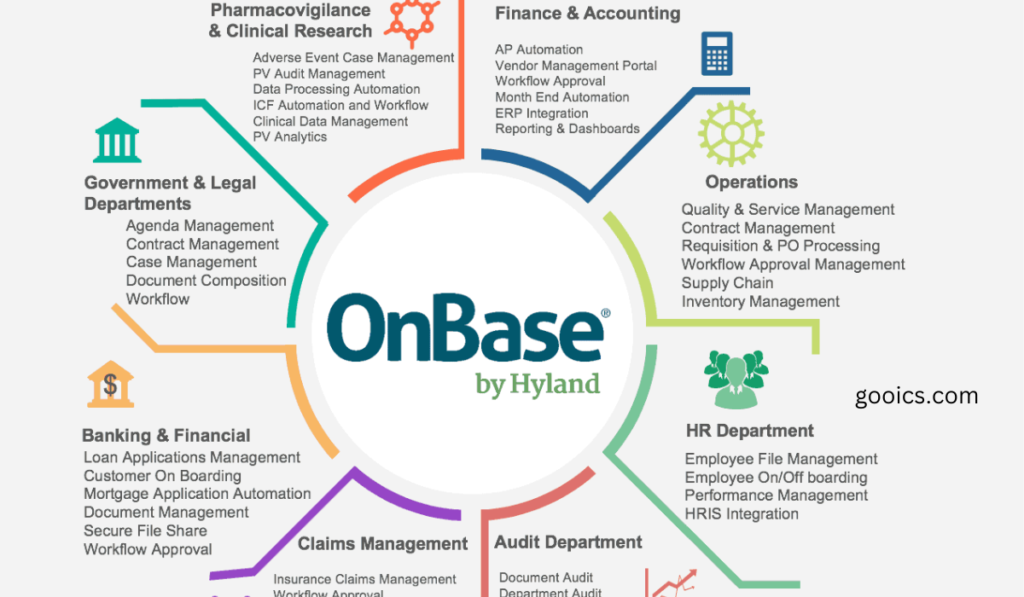
- Healthcare — Healthcare organizations use OnBase to digitize medical records and administrative documents with HIPAA-compliant encryption and audit trails. The platform also integrates with major health IT systems such as Epic and Cerner.
- Financial Services — Used for automating accounts payable, loan processing, and compliance documentation.
- Government — Supports records retention, public records requests, and case management with strong audit trail requirements.
- Higher Education — Manages student records, admissions documents, and HR processes across departments.
What Users Say
Real-world feedback on OnBase tends to cluster around a few consistent themes.
Strengths: Users commonly report significant improvements in document management and workflow efficiency, reduced paper reliance, faster data retrieval, and strong integration with existing software that supports business growth without proportional cost increases. Reviewers also praise specific features — one user noted that the “Anywhere, Anytime” login feature is especially valuable for remote and distributed teams, since it allows safe access to documents and files from any device.
Trade-offs: Cost and complexity come up frequently. Pricing and licensing are perceived as both cost-effective and relatively expensive, reflecting the platform’s modular nature and available vertical solutions, with monthly license costs commonly ranging from $4,500 to $5,000 depending on setup and add-on components like Report Services. Some users also note a learning curve: while the program is mostly intuitive, more advanced features may take additional time for less technical users to master.
On the analyst side, the platform’s reputation remains strong. Analysts at Nucleus Research and Forrester recognize OnBase as a leader in the enterprise content management market, and customers consistently achieve strong ROI through increased efficiency and visibility across departments — though success depends heavily on clearly identifying organizational needs before implementation.
Is OnBase Right for Your Organization?
OnBase tends to be the strongest fit for mid-size to large organizations that:
- Handle high volumes of regulated or sensitive documents (healthcare records, financial filings, legal contracts)
- Already run core line-of-business systems (like Epic, Workday, or SAP) that need tight content integration
- Need flexible deployment — cloud, on-prem, or hybrid — due to compliance or infrastructure constraints
- Want to reduce manual, paper-based processes across multiple departments rather than just one
Smaller organizations or those with narrower document-processing needs may find the platform’s modular pricing and configuration complexity more than they need, and might be better served by a lighter-weight, purpose-built tool.
Final Thoughts
OnBase has earned its place as one of the more established names in enterprise content management, with three decades of development behind it and a steady push into AI-powered classification, agentic automation, and cross-platform content federation. It’s not a lightweight tool, and it comes with real licensing and complexity costs — but for organizations juggling large volumes of documents across multiple systems and strict compliance requirements, it remains one of the more comprehensive options on the market.
As with any enterprise software decision, the right move is to map your specific document and workflow needs first, then evaluate how well OnBase’s modules — and its pricing — line up with those requirements before committing.
Frequently Asked Questions
What is OnBase used for? OnBase is used to centralize an organization’s documents and business content in one secure repository, automate document-driven workflows (like accounts payable, onboarding, and contract management), and feed clean, verified data into other business systems.
Who makes OnBase? OnBase is developed by Hyland Software, Inc., a global ECM company headquartered in Westlake, Ohio.
Is OnBase cloud-based or on-premises? Both. OnBase is available as a cloud-based solution, an on-premises deployment (which requires Windows Server and SQL Server infrastructure), and in hybrid configurations.
How much does OnBase cost? Pricing is modular and depends on the components you need. Reported monthly license costs commonly range from $4,500 to $5,000, with additional fees for add-ons like Report Services, document imaging, and mobile access. Licensing is generally based on a concurrent-user model.
Is OnBase secure and compliant? Yes. OnBase is SOC 2 Type II compliant and includes role-based access controls, encryption in transit and at rest, and configurable data policies to support regulatory requirements such as HIPAA in healthcare settings.
Does OnBase integrate with other systems? Yes. OnBase integrates with major line-of-business applications such as Epic, Cerner, and Workday, and its Content Federation Service connects to other content platforms like SharePoint 365, Alfresco, and Nuxeo without requiring data migration.
Does OnBase have AI features? Yes. Recent updates have added AI-driven document classification, expanded text/file recognition, low-code AI agent creation, and automated redaction for compliance purposes.
Is OnBase hard to learn? Most users find the core interface intuitive, but some advanced features and configurations have a steeper learning curve, particularly for less technical users.
What industries use OnBase the most? Healthcare, financial services, government, insurance, manufacturing, and higher education are among the most common industries using OnBase, largely due to their heavy document and compliance requirements.
What are the main alternatives to OnBase? Common alternatives include other ECM and document management platforms such as SharePoint, Alfresco, Nuxeo, Laserfiche, and Dokmee, depending on the organization’s size and specific needs.