
Introduction
Cameras are everywhere: in stores, factories, warehouses, hospitals, airports, parking lots and city streets. For decades, the footage they captured was mostly stored and reviewed only after something went wrong. A person had to watch it, and no team can watch thousands of hours of video with consistent attention.
A video analytics system changes that. Using computer vision and artificial intelligence, it analyzes video automatically, detects what matters, and turns pixels into structured data, alerts and reports. Instead of asking “what happened?” after an incident, organizations can ask “what is happening right now, and what should we do about it?”
This guide explains what a video analytics system is, how it works, the main use cases, the benefits and challenges, and how to select and deploy the right solution.
What Is a Video Analytics System?
A video analytics system is a combination of software, and often hardware, that automatically processes video streams to detect, classify, track and interpret objects, people, vehicles and events. It is also called video content analysis (VCA) or intelligent video analytics.
In simple terms, it gives cameras a layer of understanding. A standard camera records. A camera connected to a video analytics system can recognize that a person has entered a restricted zone, count how many customers passed an entrance, read a license plate, or notice that a machine operator is not wearing a helmet.
How a Video Analytics System Works
While products differ, most systems follow the same pipeline.
1. Video capture
Video comes from IP cameras, existing CCTV infrastructure, thermal cameras, drones, body-worn cameras or recorded files. Image quality, lighting, resolution, frame rate and camera placement strongly influence the accuracy of everything downstream.
2. Preprocessing
The system prepares frames for analysis by adjusting for lighting changes, reducing noise, stabilizing the image and selecting the regions of interest. This step improves reliability in difficult conditions such as night, rain or glare.
3. Detection and classification
Deep learning models, typically convolutional neural networks or transformer-based architectures, locate and label objects in each frame: person, vehicle, bag, animal, forklift, helmet, fire or smoke.
4. Tracking
Tracking algorithms follow each detected object from frame to frame and across camera views, giving every object a consistent identity as it moves. This makes it possible to measure dwell time, direction, speed and paths.
5. Behavior and event analysis
Rules and models interpret what the tracked objects are doing. Examples include crossing a virtual line, loitering, falling, running, fighting, abandoning an object, driving the wrong way or entering a forbidden area.
6. Output and integration
Results are delivered as real-time alerts, dashboards, searchable metadata, heat maps and reports. They can also trigger actions through integrations with alarm systems, access control, building management, ERP software or messaging apps.
Core Capabilities of Modern Video Analytics
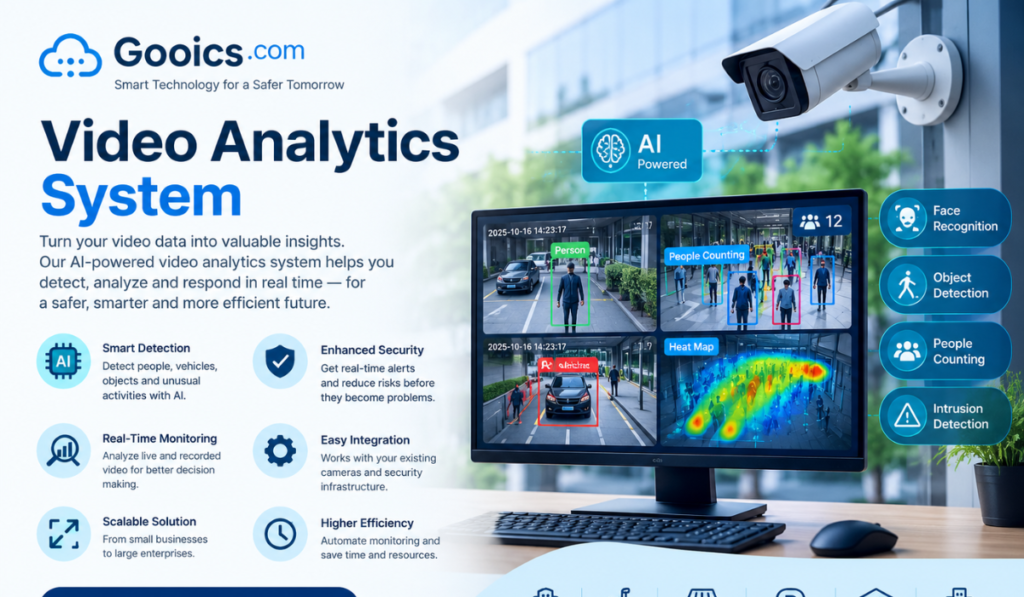
- Object detection and classification: identifying people, vehicles and specific items
- People counting and occupancy monitoring: measuring footfall and crowd levels
- Intrusion and perimeter detection: alerting on unauthorized entry
- Facial recognition: matching faces against watchlists or access lists, subject to strict legal and ethical controls
- License plate recognition (ANPR/LPR): reading plates for access, parking and enforcement
- Behavior analysis: detecting loitering, falls, fights or unusual movement
- Heat mapping and path analysis: showing where people spend time and how they move
- Safety compliance detection: checking for helmets, vests, masks and safe distances
- Smoke and fire detection: spotting hazards earlier than traditional sensors in some environments
- Forensic video search: finding specific people, vehicles or events across hours of footage in seconds
Real-Time vs. Post-Event Analytics
Real-time analytics processes video as it arrives and raises immediate alerts. It supports security response, safety intervention and operational decisions, but needs more computing power and low latency.
Post-event (forensic) analytics processes recorded footage to search, investigate and generate reports. It is ideal for incident investigation, trend analysis and auditing.
Most mature deployments use both: real-time for response, recorded analysis for investigation and long-term insight.
Edge, Cloud and Hybrid Architectures
Where the analysis happens is one of the most important design decisions.
Edge analytics runs on the camera or a nearby device. It offers low latency, reduced bandwidth use and better privacy because raw video need not leave the site. It suits remote locations and time-critical alerts.
Cloud analytics runs on remote servers. It offers elastic computing power, easy scaling, centralized management and simple model updates, but depends on bandwidth and raises data-residency questions.
On-premises servers keep processing inside your own data center, giving strong control and predictable performance for sites with strict security or compliance requirements.
Hybrid models combine them: detection at the edge, deeper analysis and long-term storage in the cloud. For many organizations this offers the best balance of speed, cost and flexibility.
Industry Use Cases
Retail
Retailers use video analytics to count visitors, measure conversion rates, analyze queue lengths, map store traffic, and detect shelf gaps. Insights help optimize layouts, staffing and promotions while reducing theft and shrinkage.
Smart cities and traffic management
Cities apply analytics to monitor traffic flow, detect accidents and congestion, manage parking, identify illegal turns, and support public safety. Adaptive signal control based on real-time vehicle counts can shorten travel times and cut emissions.
Manufacturing and industrial safety
Factories use video analytics for quality inspection, process monitoring, worker safety, and restricted-zone enforcement. Detecting missing protective equipment or unsafe proximity to machinery can prevent serious injuries.
Logistics and warehousing
Systems track vehicles at gates, monitor loading docks, measure dwell times, detect damaged goods and improve forklift and pedestrian safety.
Healthcare
Hospitals and care facilities use analytics for patient fall detection, occupancy monitoring, restricted-area control and workflow analysis, always balanced against strict privacy obligations.
Transportation hubs
Airports, railway and bus stations use analytics for crowd density monitoring, abandoned object detection, perimeter security and passenger flow optimization.
Banking and finance
Branches and ATMs use analytics for tailgating detection, suspicious behavior alerts, queue management and fraud investigation.
Education and corporate campuses
Schools and offices use analytics for access control, visitor management, space utilization and emergency response.
Key Benefits
- Proactive security: Threats are flagged as they develop, not after the fact.
- Operational efficiency: Data on movement, queues and utilization supports better staffing and layout decisions.
- Reduced human workload and fatigue: Operators focus on verified alerts rather than staring at screens.
- Faster investigations: Searching footage by attribute, such as “red vehicle, north gate, between 2 and 4 pm,” replaces hours of manual review.
- Improved safety and compliance: Automatic detection of violations helps prevent accidents and supports audits.
- Better customer experience: Shorter queues and optimized layouts improve satisfaction.
- Measurable ROI: Video becomes a data source that can be tracked against business metrics.
Challenges and Limitations
Accuracy in real-world conditions. Poor lighting, weather, occlusion, camera angles and crowded scenes reduce performance. Pilot testing on your own footage is essential.
False alarms. Systems that generate too many false positives are quickly ignored. Tuning, good camera placement and confidence thresholds matter.
Privacy and regulation. Video of people is sensitive personal data. Laws such as GDPR and a growing number of regional AI and biometric regulations impose rules on consent, retention, purpose limitation and facial recognition.
Algorithmic bias. Models trained on unrepresentative data can perform unevenly across demographics, lighting conditions or environments. Responsible vendors test and document this.
Infrastructure and cost. Processing many high-resolution streams requires significant compute, storage and network capacity.
Integration complexity. Connecting analytics to cameras from multiple manufacturers, existing video management systems and business applications can be difficult without open standards such as ONVIF.
Cybersecurity. Cameras and analytics servers are attractive attack targets and must be hardened, patched and monitored.
Privacy, Ethics and Compliance
Trust determines whether a video analytics deployment succeeds. Good practice includes:
- Defining a clear, legitimate purpose before deployment
- Collecting only the data needed (data minimization)
- Posting visible notices where required
- Using privacy features such as face blurring, anonymized people counting and metadata-only storage
- Setting retention limits and automatic deletion
- Restricting and logging access to footage
- Conducting impact assessments before using biometric or facial recognition features
- Keeping humans in the loop for decisions that affect individuals
Many valuable use cases, such as counting, occupancy, safety compliance and traffic analysis, do not require identifying individuals at all.
How to Choose a Video Analytics System
Use these criteria when evaluating vendors.
Define the use case first. Start with the problem and the metric you want to improve, not with the technology. A clear target such as “reduce unauthorized access incidents by 50%” guides every other decision.
Accuracy on your data. Ask for a proof of concept using your cameras and environments. Request measured precision and recall rather than marketing percentages.
Camera and system compatibility. Check support for your existing cameras, video management software and standards such as ONVIF and RTSP.
Deployment flexibility. Confirm support for edge, on-premises, cloud or hybrid, depending on your bandwidth, latency and compliance needs.
Scalability. The system should grow from a few cameras to thousands without rearchitecting.
Customization. Look for the ability to define custom rules, zones, schedules and, where needed, train models for site-specific objects.
Integration and open APIs. Alerts and data should flow easily into your security, business intelligence and operational tools.
Security and compliance features. Encryption, role-based access, audit logs, privacy masking and certifications matter.
Usability. Intuitive dashboards, search and reporting determine whether staff actually use the system.
Total cost of ownership. Account for licensing per camera or per stream, hardware, storage, integration, training and support, not just the initial price.
Vendor support and roadmap. Evaluate service levels, update frequency, and the vendor’s track record in your industry.
Implementation Best Practices
- Set objectives and success metrics tied to business outcomes.
- Audit your cameras and network. Check resolution, field of view, lighting, mounting positions and bandwidth.
- Run a pilot on a small number of locations and compare results to a baseline.
- Tune and train. Adjust rules, zones and thresholds using real alerts, and involve end users in feedback.
- Address privacy and legal requirements before go-live.
- Integrate with workflows. Make sure every alert has a clear owner and response procedure.
- Scale in phases, applying lessons from each stage.
- Monitor performance continuously. Review accuracy, false alarm rates and outcomes regularly, and update models as conditions change.
Measuring ROI
The value of a video analytics system should be tracked with concrete indicators, such as:
- Reduction in security incidents and losses
- Faster average incident response and investigation times
- Decrease in workplace accidents and safety violations
- Improved conversion rates, queue times or space utilization
- Hours of manual monitoring saved
- Lower insurance costs or compliance penalties
Compare these against the total cost of ownership over a three- to five-year horizon for a realistic picture.
Future Trends in Video Analytics
- Generative AI and natural-language search: Users will increasingly ask questions such as “show me everyone who entered the loading bay after midnight” and get instant results.
- Vision-language models: Systems that describe scenes and understand context, not just detect objects.
- Edge AI acceleration: More powerful, energy-efficient chips inside cameras will enable sophisticated analysis without servers.
- Multimodal analytics: Combining video with audio, sensors, access control and IoT data for richer situational awareness.
- Privacy-preserving AI: Techniques such as on-device anonymization and federated learning will help balance insight with privacy.
- Synthetic data for training: Simulated footage will help models handle rare events and reduce bias.
- Stricter regulation: Expect clearer legal frameworks around biometric analysis and high-risk AI uses.
Conclusion
A video analytics system turns passive cameras into active sources of intelligence. Used well, it improves security, safety and efficiency while generating data that supports better decisions across the organization. Used carelessly, it can create false alarms, privacy risks and wasted investment.
The path to success is consistent: begin with a specific problem, choose technology that performs on your own footage, design for privacy from day one, integrate alerts into real workflows, and measure results. With that approach, video stops being a record of the past and becomes a tool for shaping what happens next.
Frequently Asked Questions
What is a video analytics system? It is software, sometimes paired with dedicated hardware, that uses AI and computer vision to automatically analyze video, detecting objects, people and events and producing alerts, searchable data and reports.
Can I use my existing CCTV cameras? Often yes. Many systems work with existing IP cameras through standard protocols, and analog cameras can sometimes be connected through encoders. Image quality and camera placement determine how well specific analytics will perform.
How accurate is video analytics? Accuracy depends on the task, image quality, lighting and environment. Simple tasks such as people counting can be highly accurate in good conditions, while complex behavior detection is harder. Always test on your own footage before committing.
Is video analytics the same as facial recognition? No. Facial recognition is one optional capability. Most video analytics applications, such as vehicle counting, safety compliance and intrusion detection, do not identify individuals.
Does video analytics require the cloud? No. It can run on the edge, on-premises, in the cloud, or in a hybrid setup, depending on your latency, bandwidth, security and cost needs.
Is video analytics legal? Generally yes, but rules vary by country and use case. Privacy and data protection laws govern how video of people may be captured, processed, stored and shared, and biometric uses are often more tightly regulated. Consult legal counsel before deployment.
How much does a video analytics system cost? Costs vary widely based on the number of cameras, the type of analytics, deployment model and support. Pricing is commonly per camera or per stream, plus any hardware, storage and integration costs.