

Introduction
For title companies, banks, attorneys, and county recording offices, Simplifile has become a core part of how real estate documents get submitted and recorded electronically. Because so much of the closing process depends on it, even a small login hiccup can hold up a transaction. This guide walks through how the Simplifile login process works, the different sign-in options available, and how to resolve the most common access issues.
What Is Simplifile?
Simplifile is an e-recording platform that electronically connects submitters — like title companies, banks, and attorneys — with county recording offices, streamlining the document recording side of real estate transactions. The platform is now part of Intercontinental Exchange (ICE) and works alongside broader mortgage technology tools that support collaboration during and after closing. In short, it’s built specifically for the document-heavy, deadline-sensitive world of real estate closings and recordings.
How to Log Into Simplifile
Simplifile offers a few different ways to sign in, depending on how your organization has set things up:
- Sign In with Simplifile – using your standard Simplifile-issued username and password.
- Sign In with MERS – for organizations that authenticate through the MERS system.
- Sign In with Access or Sign In with Encompass – for users accessing Simplifile through ICE Mortgage Technology’s broader platform.
- Sign In with Company SSO – for organizations that have enabled single sign-on, letting employees log in using their existing company credentials rather than a separate Simplifile password.
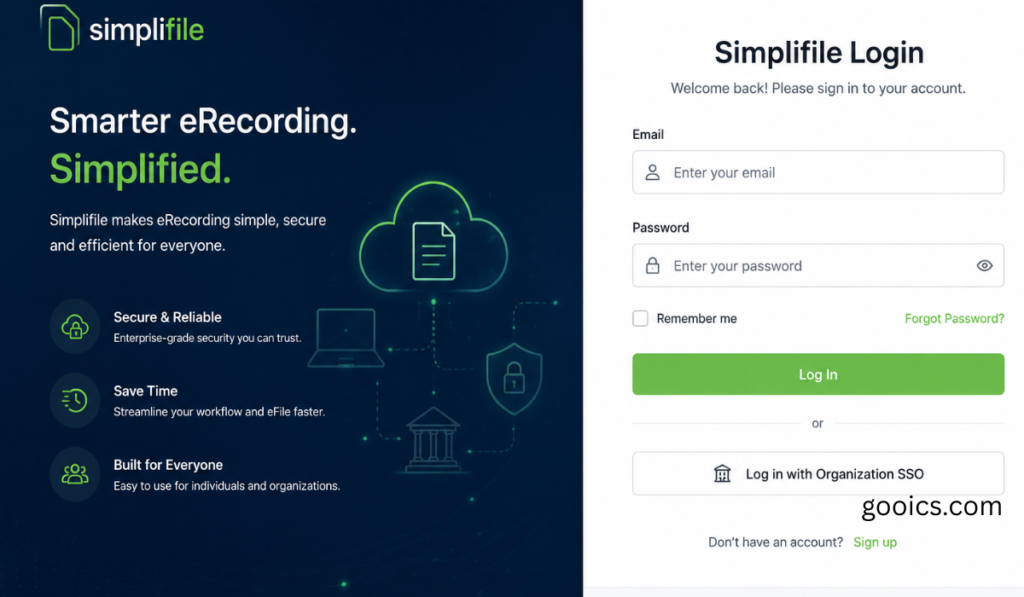
On the standard login screen, you’ll simply enter the username and password that was provided when your account was originally set up. If your organization has more than one login method enabled, you can typically set a preferred default sign-in page from your account settings.
Security Questions and Account Verification
Depending on your organization’s security policy, you may be required to set up answers to security questions the first time you log in — several used to verify your identity online, and one reserved for phone verification with Simplifile Support if needed. Users typically choose these questions from a set of predetermined options, and the answers are encrypted and stored securely. These answers can be updated at any time from your account settings if needed.
What Happens If You Forget Your Password
If you enter your password incorrectly too many times, or click the “Forgot Password” link, Simplifile will typically prompt you to answer a subset of your security questions. Answering them correctly triggers an email with a link to reset your password, sent to the address on file for your account. If your organization uses SSO or a linked platform like Encompass instead, password resets usually need to go through that system rather than Simplifile directly.
Common Login Issues and How to Fix Them
Most Simplifile login problems fall into a few familiar categories:
- Forgotten password – Use the “Forgot Password” link and follow the security question or email verification process described above.
- Browser or cookie issues – If the login page won’t load correctly or repeatedly rejects valid credentials, check that your browser allows cookies and try clearing your cache before trying again.
- Repeated failed login attempts – After enough incorrect attempts, the system may lock you out and require identity verification through security questions before resetting your password.
- Wrong sign-in method selected – If your organization uses SSO, MERS, or an Encompass-linked login, using the standard username/password screen instead may cause repeated failures — double-check which login option applies to you.
- Persistent errors – If you run into a specific error message that won’t resolve, Simplifile Support can help troubleshoot it directly over the phone.
Getting Additional Help
If none of the standard troubleshooting steps work, Simplifile’s support team is available by phone, and they also offer free online, phone-based, and in-person training for new and existing customers. Once logged in, support resources can also be accessed directly from the “Help & Support” menu inside your account.
Conclusion
Getting into Simplifile comes down to using the right sign-in method for your organization — standard username and password, SSO, MERS, or an Encompass-linked login — and knowing the recovery steps if you hit a snag. Since real estate closings often run on tight deadlines, it’s worth confirming your organization’s specific login setup and keeping your security question answers up to date, so a forgotten password never turns into a bigger delay than it needs to be.
FAQs: Simplifile Login
1. How do I log into Simplifile? Go to the Simplifile login page and choose the sign-in method your organization uses — standard username and password, Sign In with MERS, Sign In with Access/Encompass, or Company SSO.
2. What do I do if I forget my Simplifile password? Click “Forgot Password” on the login screen; if your organization requires security questions, you’ll need to answer a few of them correctly before receiving a password reset email.
3. What are Simplifile’s security questions for? They’re used to verify your identity if you forget your password or need phone support — you typically choose several questions from a predetermined list, and the answers are encrypted and stored securely.
4. Can I change my security question answers later? Yes, security questions and answers can be updated at any time from your account’s My Settings page.
5. What happens if I enter my password incorrectly too many times? After enough failed attempts, Simplifile will typically prompt you to answer security questions to verify your identity before allowing a password reset.
6. What’s the difference between signing in with Simplifile vs. MERS vs. Encompass? These are different authentication paths depending on how your organization is set up — Simplifile uses its own credentials, MERS uses the MERS system, and Access/Encompass logins go through ICE Mortgage Technology’s broader platform.
7. What is Company SSO, and how does it affect login? Single sign-on (SSO) lets employees log into Simplifile using their existing company credentials instead of a separate Simplifile password, if their organization has it enabled.
8. Why won’t the Simplifile login page load or accept my credentials? This is often caused by browser cookie settings or cached data — try enabling cookies and clearing your browser cache before attempting to log in again.
9. Who do I contact if I can’t resolve a Simplifile login issue myself? Simplifile Support can be reached by phone for troubleshooting help, and they also offer free online, phone-based, and in-person training for customers.
10. Can I set a default login method if my organization uses more than one? Yes, you can typically choose a preferred default sign-in page from your account settings if multiple login methods are available to you.



Pingback: Claude AI vs ChatGPT: Which AI Assistant Is Right for You