
Introduction
Technology moves fast, and keeping up with the right tools, platforms, and learning materials can feel like a full-time job on its own. Whether you’re a student trying to learn to code, a small business owner looking for software to run your operations, or a professional trying to stay current in a fast-changing field, having a reliable set of technology resources makes the difference between wasted time and real progress.
This guide breaks down what technology resources actually are, the main categories worth knowing, where to find trustworthy ones, and how to build a personal or team resource stack that actually gets used instead of collecting dust in a bookmarks folder.
What Are Technology Resources?
Technology resources are the tools, platforms, documentation, and learning materials people use to solve problems, build skills, or run their work more efficiently. This is a broad category, and it can include anything from a free coding tutorial to enterprise-grade cloud infrastructure. What ties them together is a simple purpose: helping people or organizations use technology more effectively than they could on their own.
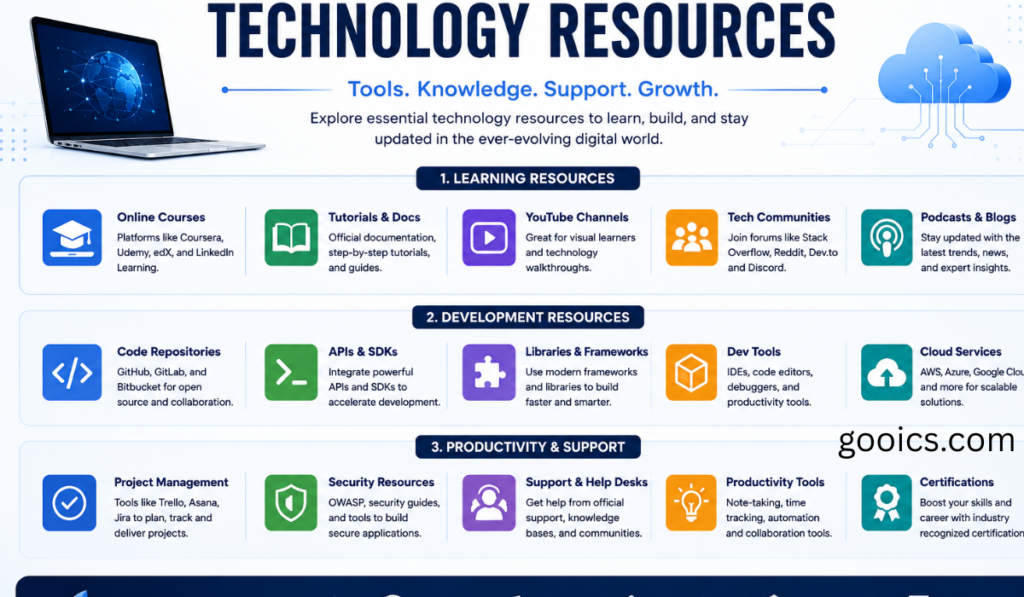
Broadly, technology resources fall into a few overlapping groups:
- Learning resources — tutorials, courses, documentation, and communities that help people build technical skills
- Software tools — applications and platforms that solve a specific task, from project management to design to data analysis
- Hardware and infrastructure resources — cloud services, servers, devices, and networking tools that support technical work
- Reference and research resources — official documentation, technical standards, and knowledge bases used to solve specific problems
- Community and support resources — forums, user groups, and support channels where people troubleshoot and share knowledge
Why Technology Resources Matter
They shorten the learning curve. Good documentation, tutorials, and structured courses mean someone doesn’t have to learn everything through trial and error. A clear resource can save hours or days compared to piecing together an answer from scattered, unreliable sources.
They reduce costly mistakes. Reliable reference material and official documentation help people avoid decisions based on outdated or incorrect information, which matters especially in areas like security, data handling, or infrastructure choices where mistakes are expensive to fix later.
They support better tool decisions. With so many overlapping software options in every category, having a way to compare and evaluate tools objectively — rather than picking whatever is most heavily marketed — helps individuals and teams choose things that actually fit their needs.
They keep skills current. Technology doesn’t stand still. Frameworks update, best practices shift, and new tools emerge constantly. Ongoing access to good resources is what lets people keep their skills relevant rather than falling behind.
Types of Technology Resources Worth Knowing
Official documentation
Every major platform, language, and tool maintains its own documentation. This is usually the most accurate and up-to-date source available, even if it’s not always the easiest to read for beginners. When in doubt, official docs should be the first stop, not the last.
Online courses and tutorials
Structured courses — free and paid — remain one of the most effective ways to build a new skill from scratch. The best ones combine explanation with hands-on practice rather than passive video-watching.
Developer and user communities
Forums, Q&A sites, and community spaces built around specific tools or languages are often where the most practical, real-world troubleshooting knowledge lives — the kind of edge cases that don’t always make it into official documentation.
Open-source repositories
Publicly available code repositories let people see how real projects are built, learn from working examples, and in many cases reuse existing tools instead of building something from scratch.
Comparison and review sites
Independent sites that test and compare software tools help people cut through marketing claims and figure out which option actually fits their specific use case, budget, and team size.
Internal knowledge bases
For teams and organizations, internally maintained documentation — covering how specific systems are configured, what decisions were made and why, and how to troubleshoot recurring issues — is often the most valuable resource of all, precisely because it’s tailored to that team’s exact setup.
How to Build a Reliable Technology Resource Stack
A few habits make the difference between a useful set of resources and an overwhelming pile of bookmarks:
- Start with official sources. Before relying on a third-party tutorial or forum post, check whether the tool or platform has its own documentation. It’s usually more accurate and more likely to stay current.
- Prioritize resources that get updated. Technology resources go stale quickly. A five-year-old tutorial on a fast-moving framework may do more harm than good. Favor sources with visible update dates or active maintenance.
- Match the resource to the problem, not the trend. A resource doesn’t need to be the newest or most popular to be the right one — it needs to solve the actual problem in front of you.
- Keep a short, curated list rather than a sprawling one. A small set of trusted, well-organized resources is more useful day-to-day than a massive, disorganized collection that’s hard to search when you actually need something.
- Revisit and prune periodically. Tools get discontinued, documentation moves, and better resources appear. A quarterly review of your go-to list keeps it useful instead of outdated.
Conclusion
Technology resources — from official documentation to community forums to well-maintained internal wikis — are what make it possible to learn new skills, make sound tool decisions, and keep pace with a field that never stops changing. The goal isn’t to collect as many resources as possible; it’s to build a small, reliable, regularly updated set that actually gets used when a real problem shows up. Whether you’re learning your first programming language or evaluating enterprise software for a team, the same principle holds: favor resources that are current, credible, and matched to the actual problem you’re trying to solve.
Technology Resources: Frequently Asked Questions
What are technology resources?
Technology resources are the tools, platforms, documentation, and learning materials people use to solve problems, build skills, or work more efficiently. This includes things like official software documentation, online courses, developer communities, open-source code, comparison sites, and internal knowledge bases.
What are the main types of technology resources?
They generally fall into a few categories: learning resources (tutorials, courses, documentation), software tools (applications built for specific tasks), hardware and infrastructure resources (cloud services, servers, networking tools), reference and research resources (official docs, technical standards), and community and support resources (forums, user groups, and help channels).
Where can I find reliable technology resources?
The most reliable starting point is usually a platform or tool’s own official documentation, since it tends to be the most accurate and current source available. Beyond that, established developer communities, open-source repositories, and independent comparison sites are good next steps, especially for practical, real-world troubleshooting that official docs may not cover.
Are free technology resources as good as paid ones?
It depends on the resource, not the price tag. Many of the best learning materials, tools, and communities are free, especially official documentation and open-source projects. Paid resources tend to offer more structure, support, or advanced features, but a free resource that’s well-maintained and current is often more valuable than a paid one that’s outdated.
How do I know if a technology resource is trustworthy?
Look for a few signals: is it maintained by the tool’s official creators or a recognized authority, does it show a recent update date, and is it specific enough to actually address your problem rather than offering generic advice. Resources that are frequently updated and actively used by a real community are usually more reliable than ones that haven’t been touched in years.
Why do technology resources go out of date so quickly?
Software, frameworks, and best practices change constantly, so a tutorial or guide that was accurate a few years ago may reference outdated versions, deprecated features, or practices that are no longer recommended. This is especially true in fast-moving areas like web development, cloud infrastructure, and AI tools.
What’s the difference between a technology resource and a technology tool?
A tool is something you use directly to complete a task, like a piece of software or a cloud service. A resource is broader — it can be a tool, but it can also be documentation, a course, a community, or reference material that helps you use tools more effectively or make better decisions about which ones to use.
How can a small business find the right technology resources?
Start by clearly defining the problem you’re trying to solve, then look at independent comparison and review sites to see how different tools stack up for businesses of a similar size. Official documentation and vendor support resources are useful once you’ve narrowed down a shortlist, and peer communities or forums can offer honest, real-world feedback that marketing materials won’t.
What technology resources are best for learning a new skill?
Structured online courses that combine explanation with hands-on practice tend to work best for building a skill from scratch, especially when paired with official documentation to reinforce accuracy. Developer communities and forums are useful once you’ve got the basics down and start running into specific, real-world problems.
Should I rely on internal company documentation or outside sources first?
Internal, team-maintained documentation is usually the most valuable resource for anything specific to how your organization’s systems are set up, since it reflects your actual environment and past decisions. Outside sources like official documentation or public tutorials are better for general concepts, new tools, or skills not yet covered internally.
How often should I update my list of go-to technology resources?
A periodic review, roughly every few months, is a reasonable habit. Tools get discontinued, documentation gets restructured, and better resources appear over time, so a resource list that isn’t reviewed occasionally can quietly become outdated without anyone noticing.
What’s the best way to organize technology resources so they’re actually useful?
Keep the list small and curated rather than exhaustive. A short set of trusted, well-organized resources that you actually remember to use is far more valuable day-to-day than a large, scattered collection that’s difficult to search when you need something specific.