
Introduction
Every digital product starts as a rough idea of what goes where. Traditionally, turning that idea into a wireframe meant hours of dragging boxes, labeling placeholder buttons, and redrawing the same screen five different ways before a team could agree on a direction. AI wireframing tools have changed that process. Today, you can describe a screen in plain language, upload a sketch or screenshot, or even paste in a live website URL — and get back an editable, structured wireframe in seconds rather than hours.
This guide breaks down what AI wireframing tools actually do, why so many product teams, designers, and founders are adopting them, which tools lead the category right now, and how to choose the right one for your workflow.
What Are AI Wireframing Tools?
AI wireframing tools use generative AI to turn a prompt, sketch, screenshot, or existing website into a wireframe — a low-to-mid fidelity representation of a screen’s layout, structure, and flow. Instead of manually placing every button, form field, and navigation element, you describe what you want (“a SaaS dashboard with filters, empty states, and a chart”) and the tool generates a starting layout you can edit.
The best tools in this category don’t just generate a static image. They produce editable, structured output — layers, components, and sometimes design-system-aware elements that can be swapped, resized, or handed directly to developers.
Why Teams Are Adopting AI Wireframing Tools
Speed from idea to first draft. What once took a designer half a day — mapping out an onboarding flow, a checkout process, or a dashboard layout — can now happen in minutes. This matters most in early discovery, where the goal is testing many directions quickly rather than polishing one.
Lower barrier for non-designers. Product managers, founders, and engineers without deep design training can produce a credible first draft on their own, which speeds up early conversations with designers and stakeholders instead of starting from a blank page.
Better alignment before development. A wireframe is meant to be a structural argument about what goes where — a way to settle layout and flow questions before anyone debates colors or fonts. AI tools that generate multiple options fast make it easier to compare structural approaches side by side before committing engineering time.
Smoother handoff. Many modern tools plug directly into Figma or generate front-end-ready components, shortening the gap between an early concept and a build-ready design.
Top AI Wireframing Tools to Know
The category splits into a few distinct types of tools, each suited to different needs.
Prompt-to-wireframe generators
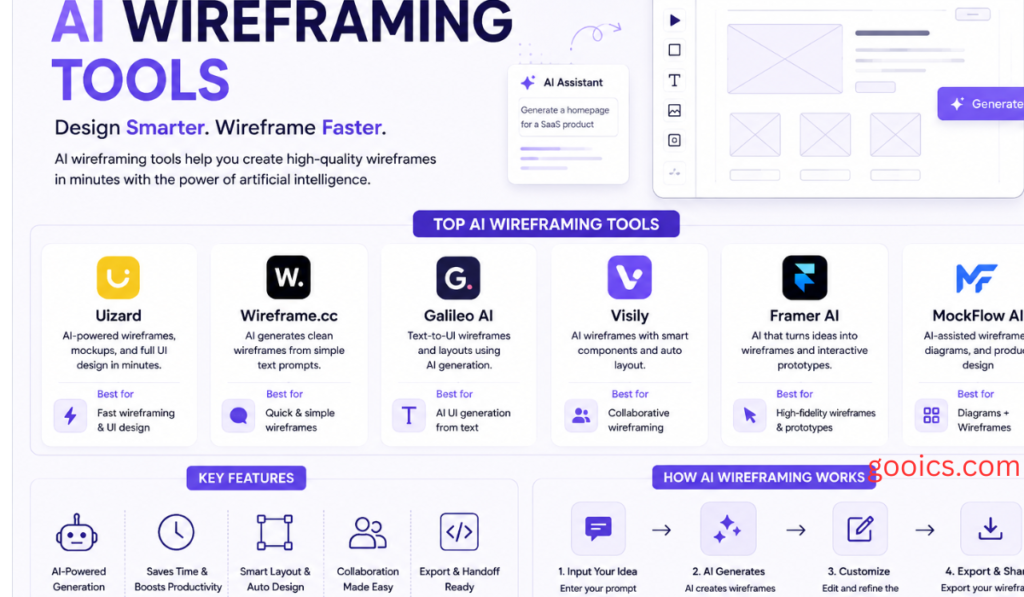
Tools like Visily, Uizard, and Banani turn a short text prompt or reference screenshot into an editable wireframe. These are generally the easiest entry point for non-designers — product managers or founders can describe a screen and get something usable within a minute or two, often with a path to export into Figma.
Figma-native and design-system-aware tools
Figma Make and plugin-based tools built around Figma extend AI generation directly inside existing design files, which matters for teams that already have a component library and don’t want AI output that has to be rebuilt from scratch to match their design system.
Flow-first and structure-first generators
Tools such as UXMagic focus less on generating a single pretty screen and more on producing connected, logically consistent flows — multi-screen journeys where navigation and state logic hold together, including options to clone an existing live URL as an editable starting point.
Whiteboard and workshop-style AI
Miro’s AI Canvas and Whimsical’s AI features bring generation into a collaborative whiteboard setting, useful for teams that want to wireframe, diagram, and document in the same space during a live workshop.
AI-to-code tools
Tools like v0, Lovable, Bolt.new, and Framer AI sit at the far end of the spectrum, generating working front-end code rather than a static wireframe — useful when a team wants to skip the wireframe stage entirely and go straight to a functional prototype.
Traditional tools with AI layered in
Established players like Figma, Balsamiq, Sketch, and UXPin have added AI features on top of their core wireframing and prototyping strengths — Balsamiq for deliberately rough, low-fidelity sketches that keep feedback focused on structure, and Figma for teams that want a wireframe to grow into a polished, developer-ready interface without switching files.
How to Choose the Right Tool
There’s no single “best” AI wireframing tool — the right pick depends on where the wireframe needs to go next. A few questions worth asking before committing to one:
- Where does this wireframe end up? If it needs to become a polished, on-brand UI inside an existing design system, a Figma-native tool matters more than a standalone generator. If it’s headed straight to code, an AI-to-code tool may skip a step entirely.
- Who’s using it day to day? A solo founder validating an idea has very different needs than a product team running dozens of screens through a shared design system.
- Does the AI produce editable work, or just a picture? Some tools generate genuinely editable layers and components; others produce a static image that still needs to be rebuilt by hand. This distinction matters more than almost anything else on the feature list.
- How much fidelity do you actually want? Wireframing splits roughly into low, mid, and high fidelity. Choosing a tool that pushes more polish than you need at this stage is one of the most common mistakes teams make — a wireframe that looks too finished invites feedback on colors and spacing instead of structure.
- How well does it handle complex flows? A tool that works well for a single landing page can fall apart once a flow branches into multiple states, empty states, and edge cases. Testing a tool against a real multi-screen flow, not just one screen, is the better way to evaluate it.
A useful test before choosing: run the same two or three prompts across your shortlist — a mobile onboarding flow with sign-up options, a dashboard with filters and empty states, and a checkout flow with shipping and payment steps — and compare how each tool handles structure, editability, and handoff.
Conclusion
AI wireframing tools haven’t replaced design thinking — they’ve compressed the time it takes to get a first draft in front of people who can react to it. The category now ranges from simple prompt-to-screen generators built for non-designers, to Figma-native tools that respect existing design systems, to AI-to-code tools that skip wireframing altogether. Choosing the right one comes down to matching the tool to what happens after the wireframe is made, not just how good the first screen looks. Whatever your workflow — solo founder, design team, or engineering-led product squad — there’s now an AI wireframing tool built for exactly how you work, and testing two or three against the same real-world prompts is the fastest way to find it.
AI Wireframing Tools: Frequently Asked Questions
What are AI wireframing tools?
AI wireframing tools are software applications that use generative AI to turn a text prompt, sketch, screenshot, or existing webpage into a wireframe — a low-to-mid fidelity layout showing a screen’s structure, content blocks, and flow. Instead of manually placing every box and label, you describe the screen you want and the tool generates an editable starting layout in seconds.
How do AI wireframing tools work?
Most tools work in one of three ways: you type a text prompt describing the screen or flow you need, you upload a reference image or screenshot for the AI to interpret, or you paste in a live URL for the tool to clone into an editable layout. The AI then generates layers, components, and basic structure that you can rearrange, resize, or swap out.
Are AI wireframing tools only for designers?
No. One of the biggest draws of these tools is that non-designers — product managers, founders, and engineers — can produce a credible first draft without design training. This helps move conversations forward faster, though most teams still bring in a designer to refine the AI-generated draft into a polished, on-brand interface.
What’s the difference between AI wireframing tools and AI prototyping tools?
Wireframing tools focus on structure, layout, and flow logic — the “what goes where” of a screen. Prototyping tools go a step further by adding interactivity, conditional logic, and clickable states so stakeholders can click through a flow as if it were a real product. Some tools, like Figma, cover both in a single file; others specialize in one or the other.
Can AI wireframing tools generate multi-screen flows, not just single screens?
Yes, though quality varies by tool. Some AI wireframing tools are optimized for single-screen generation and struggle once a flow branches into multiple states, empty states, or edge cases. Flow-first tools are built specifically to keep navigation and logic consistent across a full multi-screen journey, which is worth testing before committing to a tool for a complex product.
Do AI-generated wireframes come out editable, or just as images?
This depends heavily on the tool. The stronger AI wireframing tools produce genuinely editable layers and components that can be moved, resized, and restyled. Weaker tools generate a static image that still has to be manually rebuilt in a design tool before anyone can actually use it. This distinction is one of the most important things to check before adopting a tool.
Can AI wireframing tools work with an existing design system?
Some can. Figma-native AI tools and plugins are built to generate wireframes using a team’s existing component library, so the output already matches brand fonts, colors, and spacing rules. Standalone AI generators, by contrast, often produce generic components that need to be manually swapped for approved design-system elements afterward.
What fidelity level should an AI-generated wireframe be?
Wireframing generally spans low, mid, and high fidelity. Low-fidelity wireframes use simple gray boxes and placeholder text to keep feedback focused on layout and structure. Higher-fidelity wireframes look closer to a finished screen. A common mistake is generating wireframes with more visual polish than needed at an early stage, since overly finished-looking drafts tend to shift feedback toward colors and styling instead of structure.
Can AI wireframing tools turn a wireframe into real code?
Some tools sit at the far end of the spectrum and generate working front-end code directly from a prompt, skipping the traditional wireframe stage entirely. These are useful when a team wants to move straight from an idea to a functional prototype, though they generally offer less control over exact layout decisions than a dedicated wireframing tool.
How much do AI wireframing tools cost?
Pricing varies widely across the category. Many tools offer a free tier with limited AI generations or credits per month, with paid plans typically ranging from around $10 to $25 per user per month for individuals and small teams. Enterprise plans with SSO, design-system integration, or higher usage limits usually cost more. Since pricing changes frequently, it’s worth checking each tool’s current pricing page before committing.
Which AI wireframing tool is best for non-designers?
Tools built around simple text-to-wireframe generation, like Visily and Uizard, tend to be the easiest entry point for product managers, founders, and other non-designers, since they require no prior design or Figma experience to produce a usable first draft.
Which AI wireframing tool is best for teams already using Figma?
Figma-native AI features and plugins tend to be the strongest fit here, since they generate wireframes directly inside existing files and can pull from a team’s established component library, avoiding the extra step of exporting and rebuilding work from a separate tool.
Do AI wireframing tools replace UX designers?
No. AI wireframing tools speed up the earliest, roughest stage of the design process — getting a first draft in front of people to react to. They don’t replace the judgment involved in refining a layout, testing it with real users, ensuring accessibility, or maintaining consistency across a full product. Most teams use these tools to accelerate the first draft, then rely on designers to take it the rest of the way.
How do I choose the right AI wireframing tool for my team?
Start by asking where the wireframe needs to go next — a polished on-brand UI, a developer handoff, or straight to code — since that determines whether a Figma-native tool, a standalone generator, or an AI-to-code tool fits best. It also helps to test a shortlist of tools against the same few prompts, such as an onboarding flow, a dashboard with empty states, and a checkout flow, to compare how each handles structure, editability, and more complex flows before settling on one.